Free Download Download and play free Mania Games. Build a successful business and watch your fortune grow as you play these fast-paced, entrepreneurial games! Install is a popular game console game known as PC and PlayStation


All themes free download wordpress Blogger Temples for free
Showing posts with label UAG. Show all posts

Monday, 2 February 2015

Exchange 2013 Sign Out behavior on Microsoft UAG - To finish signing out, please close all open browser windows.

By February 02, 2015
Recently we noticed with some Exchange 2013 customers having their OWA (Outlook Web access) published on Microsoft UAG (Latest SP4 Rollup update) that they can't sign out properly from their OWA session and instead they get the message "To finish signing out, Please close all open browser windows"


When the user hits OK, nothing happened and he is still logged in.

This issue is not related to the UAG OWA setup or the UAG authentication but rather the Exchange Virtual directories authentication. This behavior occurs because the Exchange OWA virtual directories are set to Windows Integrated Authentication.

In order to change this you will need to do the following:


  1. From Exchange Admin Center go to Servers - Virtual Directories (Pick your server if you have multiple servers.
  2. Edit the OWA (Default Web Site) Authentication.
  3. Uncheck "Use one or more standard authentication methods" and pick an option in the below FBA (Forms based authentication) as shown in the below image                                                                                                                                                                                                                                                                                                                                                                                                                                                                                          
  4. You will need to do the same for the ECP virtual directory (Actually it will display message with this)
  5. Reset/Restart the IIS and the logoff should be normal as expected.


Hopefully this can help anyone encountering this issue.


Read More...

Friday, 3 October 2014

UAG Direct Access client Fail to connect. DA is configured and disabled.

By October 03, 2014 ,
I got couple of users using Windows 7 reporting that they can't connect using Direct Access anymore whether its HTTPS or Teredo, DA just won't work. Upon further discussing the issue with them they mentioned that they enabled and disabled the Direct Access Connectivity assistant (DCA) Use Local DNS couple of times in an effort to work it out.

We started troubleshooting by checking the Name Resolution Policy table and we noticed that the NRPT was not getting applied on the DA client as shown below.


The next step was checking the DA resolution using the netsh dns show state command and it turned to be disabled.


Name Resolution Policy Table Options
--------------------------------------------------------------------

Query Failure Behavior                : Always fall back to LLMNR and NetBIOS
                                        if the name does not exist in DNS or
                                        if the DNS servers are unreachable
                                        when on a private network

Query Resolution Behavior             : Resolve only IPv6 addresses for names

Network Location Behavior             : Never use Direct Access settings

Machine Location                      : Outside corporate network

Direct Access Settings                : Configured and Disabled

DNSSEC Settings                       : Not Configured


The DA client already has the correct group policies, certificates but its disabled.

The next step was checking the below registry key:

"HKEY_LOCAL_MACHINE\SOFTWARE\Policies\Microsoft\Windows NT\DNSClient EnableDAForAllNetworks"

The value of the key was set to 2 which means that DA is disabled !

Upon deleting the registry key, the DA started working normally without any problem.

For more information about the EnableDAForAllNetworks and its different values please check the below URL. 


On both cases that i have seen so far the reason was playing with the DCA settings (Use local DNS) which triggered the flipping of this registry key from Automatic to disabled.


Hopefully this could help someone with the same problem.


Read More...

Monday, 29 September 2014

Publish RDS 2012 R2 VDI Pool on Microsoft UAG 2010 SP4

By September 29, 2014
Unfortunately there is no much information (almost nothing) available from Microsoft regarding publishing Virtual Desktop Infrastructure (VDI) Pool on Microsoft UAG 2010. Two years ago i published an article on this same topic but it was targeting publishing the VDI pool from 2008 R2 Virtualization Host server to UAG 2010. You may check it on the following link http://itcalls.blogspot.com/2012/05/publishing-microsoft-pool-vdi-on-uag.html

Lately we updated all our Remote Desktop services servers and upgraded everything to 2012 R2 including the VDI pool (Updating the pool with Windows 8.1 machines). I followed the same steps in my previous article but it didn't work.

The main trick is that in the old RDS version 2008/2008R2 the Session Host (RDSH) was the redirection server. This architecture changed in 2012/2012 R2 servers and the Connection Broker is the component that do the redirection (RDCB).

Since publishing the 2012 R2 VDI is not officially certified with UAG 2010 and to get around this issue,  our team checked the below old article to bypass checking resources.

http://support.microsoft.com/kb/2702989

All We need to do is to adjust the Registry key on the UAG server as shown below:

HKEY_LOCAL_MACHINE\Software\WhaleCom\e-Gap\Common

DWORD Value: TSDontCheckResources
Value data: 1


So what does this Registry key will actually do ?

When connecting to the Remote Desktop Server, the Broker returns the resources list it receives from the RDSH and it picks up all IP addresses on all interfaces on the server. Now the UAG server needs to resolve all the IP addresses returned in the resource list to names and verify if they resolve to the same server. If the resource list contains IPV6 addresses, this lookup fails and hence the security check fails and the connection fails to launch one of the VDI machines in the pool.


To Make it work, i followed my earlier article and then added this key and its working fine.


Read More...

Wednesday, 18 December 2013

Bye Bye Microsoft UAG !

By December 18, 2013
Yesterday Microsoft Announced officially that there will be no new future full version of Microsoft UAG. Server 2012 and 2012R2 will cover some of the UAG features as Direct Access and basic secure application publishing. This was quite expected especially after the TMG retirement and the new web application proxy that was introduced in Server 2012 R2.


For more details on the latest changes to the Forefront family, please check the below article

http://blogs.technet.com/b/server-cloud/archive/2013/12/17/important-changes-to-the-forefront-product-line.aspx
Read More...

Wednesday, 27 November 2013

UAG 2010 SP4 Released to support Windows 8.1 and IE 11

By November 27, 2013 ,
Good news for all Microsoft UAG 2010 users, Service Pack 4 (SP4) was released officially yesterday to support Microsoft Latest Operating system Windows 8.1 and Internet Explorer 11 (IE 11). This new SP4 provides other important features as the support of Remote Desktop Connection RDC 8.1 and the Remote Apps published from Remote Desktop session Host on Windows 2012 or 2012 R2.

The Link to download the Latest SP4 is as follows:

https://www.microsoft.com/en-us/download/details.aspx?id=41181


For More details about features and fixes included in this Service Pack, please check the following link:

https://support.microsoft.com/kb/2861386


Service Pack 4 includes some other fixes as well as stability and performance enhancements, I will give it a try and hopefully it will be smooth operation.


Read More...

Thursday, 7 March 2013

UAG 2010 File Access application fails to open/start after UAG 2010 SP3 implementation

By March 07, 2013

After the install of UAG 2010 SP3, all of the portal applications worked fine except for the File Access application. I tried several options with the application, removing it and adding it back but never worked till I asked my friend Ben Ari (UAG Senior Escalation engineer) as I thought it was depreciated. It turned out to be a glitch or bug after implementing the UAG 2010 SP3 and to fix you need to do the following:
 
1.       On the UAG server, Navigate to the following folder under UAG installation folder \Microsoft Forefront Unified Access Gateway\von\FileAccess

2.       Edit the file “default.asp” (I took a backup first before any change)

3.       Modify the word cint to parseInt on Line 20 (Or you can search the file as it appears once). Make sure that the “I” in “parseInt” is written in caps (Check below screenshot)


4.       Save and activate your Forefront UAG

 It should be noted that incase there are more than one UAG server in the array, this change should be applied on all servers manually by the same method and steps above.
Read More...

Tuesday, 5 March 2013

UAG 2010 Portal error 403.14 after applying UAG 2010 SP3

By March 05, 2013
The UAG 2010 SP3 was officially released on Feb 20, 2013 as promised by the UAG team to resolve several issues mainly to support Microsoft new systems and applications (Windows 8, Server 2012, Exchange 2013, SharePoint 2013...............etc). Thanks UAG team.

Download Link:  http://www.microsoft.com/en-us/download/details.aspx?id=36788

Release Notes: http://support.microsoft.com/kb/2744025


I will discuss my SP3 installation process and my comments for a successful implementation in another Post. One of the main issues that i faced after the installation of the UAG 2010 SP3 was that all my users were unable to access the UAG Portal page or any published site on the UAG (Mail OWA, SharePoint............etc) and the following error is Displayed:

Forbidden Directory, Listing Denied Error code 403.14

Microsoft has a good KB that deals with this error (http://support.microsoft.com/kb/961172) however in my case i needed to reboot the IIS later on. The Steps done to fix this issue is as follows:


  1. Open Forefront UAG management on the UAG server.
  2. Open/Explore the Trunks under the HTTP and/or HTTPS connections.
  3. Right click each Trunk and select Disable.
  4. Save and Activate the UAG configuration.
  5. Right Click the trunks again and select enable.
  6. Save and Activate the Configuration again.
  7. Open the IIS Manager
  8. Highlight your server name and from the actions hit restart to restart the IIS. This should do the trick.

Hopefully this should help anyone facing this problem after UAG SP3.

    Read More...

    Tuesday, 19 February 2013

    Microsoft UAG backup using DPM 2012

    By February 19, 2013 ,
    I have been working on this issue for some time and it was always failing with different kind of errors, i consulted Microsoft Team as well and finally it worked with me. I am using DPM 2012 but it shouldn't differ with any earlier DPM version as 2010. The main blocking issue here is the TMG component on the UAG server. Remember that its highly recommended not to touch the TMG configuration on the UAG however this is one of the rare cases that need the administrator to tweak some TMG settings. To enable the DPM to backup UAG and install the client you need to do the following (Make sure to take Full backup from your TMG settings and Rules):


    1. Ensure the File and Printer sharing is checked/Enabled on the UAG internal Network card.

    2. From the TMG console- Firewall Policy. On the right pane click show system Policy rule

    3. You need to disable system Rule number 2 (Allow Remote Management from selected computers using MMC) by Right clicking the rule and edit system policy, I am assuming the default TMG rules are not touched before.

    4. You need to disable System Rule number 22 (Allow RPC from Forefront TMG to Trusted servers)

    5. From the Right Pane, in the toolbox section create a new Protocol under user defined. The Protocol parameters as follows:

    Primary connection: Type: TCP, Direction: Outbound, Port range: 135-135

    Secondary Connection: Type: TCP, Direction: Outbound, Port range: 1024 - 65535

    6. Final Step, create a new Access Rule (Make sure to move it to the top). Allow - All outbound traffic except selected (Choose - RPC All interfaces) - From DPM server (Create computer object with DPM IP address)- To Local Host (UAG server) - All users................etc


    Save the Settings and ensure they are Synced from the monitoring tab. Now try to install the Agent from the DPM on the UAG server and take a simple test backup.
    Read More...

    Thursday, 29 November 2012

    Microsoft UAG 2010 SP3 Under Work to Support Windows 8 & IE 10

    By November 29, 2012
    Microsoft officially announced couple of days ago that UAG 2010 SP3 will be released the first quarter of 2013. This new Service pack will provide support for Windows 8 and IE 10 as well as other applications as Exchange 2013, Sharepoint 2013.........etc

    The support of DirectAccess clients running Windows 8 as well as the normal Service pack fixes and improvements are expected.


    Looking forward to getting the new Service pack and testing it with Windows 8.


    Update: Microsoft UAG SP3 is released on Feb 2013 and can be downloaded from http://www.microsoft.com/en-eg/download/details.aspx?id=36788

    Also UAG SP3 Rollup 1 which is released to fix several issues with SP3 is released on April 2013 (Need SP3 to be already installed) and can be downloaded from http://support.microsoft.com/kb/2827350
    Read More...

    Saturday, 17 November 2012

    UAG 2010 RDP Application Failure after applying November 2012 KB2592687 Update

    By November 17, 2012

    I had a problem accessing any RDP application on my UAG portal (whether its Remote App application , RDP User defined, RDP Gateway or VDI Pool– Predefined Remote Desktop Host), after several hours and investigation with Microsoft team, it turned to be an update released more than 2 weeks ago KB2592687 regarding RDP 8.0 update.
     
     
    Looks like UAG Portal is not yet compatible with the new RDP 8.0 update. After uninstalling/Removing this update from my client machine (Windows 7), everything worked fine. I would recommend everyone using the UAG portal to hold for this update till its fully compatible. I escalated this issue for further investigation.
     
    For Corporates with WSUS implementation, they may decline/Disapprove this update till further update.
    Read More...

    Friday, 19 October 2012

    Microsoft UAG 2010 Web Monitor All Events displays Message ID 108 Every Minute

    By October 19, 2012
    After applying Microsoft UAG 2010 SP2 released couple of month ago I noticed that the UAG Web Monitor All Events Message ID 108 is repeated all the way and almost every minute as shown below.


    After discussing this issue with Microsoft Escalation Team, it turned that its a known issue after UAG SP2 related to group memberships. Microsoft is aware of this issue and they have a private fix for this specific problem. After applying this fix, I didn't encounter this warning again.

    I would recommend anyone having this warning to open a case with Microsoft to get this fix, this case shouldn't be counted since its a known bug.
    Read More...

    Friday, 12 October 2012

    Manual add of Shares to Microsoft UAG File Access

    By October 12, 2012
    Microsoft UAG 2010 File Access is a nice feature to securely publish your internal shares on your UAG Portal for Internet users. To successfully publish your shares on UAG portal and for the File access to work, it requires the following:


    1. NETBIOS should be enabled, Ports 137-139 should be open and not blocked by any internal Firewall
    2. Port 445 for SMB should be open so UAG server can access/Locate the shares.
    3. On the UAG NIC facing the internal Network as well as on your Domain Controllers NICs, make sure to enable the NETBIOS Over TCP from the NIC advanced properties (WINS Tab).
    4. The File servers should have the Turn On discovery feature enabled (check attached) from the Network card advanced sharing options. By design it will turn off automatically unless you started several services as SSDP and UPnP services, please check this thread for more information http://social.technet.microsoft.com/Forums/en-US/windowsserver2008r2networking/thread/17e7b386-53ea-411c-8d90-cf4a6229ba27
    Turn on Network Discovery


    Sometimes its hard to configure all these settings or maybe its restricted by your network policy. To manually add a network share or even DFS share to your UAG file access you need to modify the ShareAccessCfg.xml (This is the core file for the File Access Application). This file is located under ..\Microsoft Forefront Unified Access Gateway\von\FileAccess

    The ShareAccessCfg.xml file can be edited easily using a notepad or any Free XML Editor, one editor that i use frequently is the Microsoft XML Notepad 2007 http://www.microsoft.com/en-us/download/details.aspx?id=7973

    To manually add a server or Share you need to add them under the Server section or Share section as shown below

       <servers>
    <server name="Domain\Server1" marked="1" provider="MS"/>
    </servers>
    <shares>
    <share name="Domain\Server1\Share_name" marked="1" provider="MS"/>
    </shares>

    After changing and saving the ShareAccessCfg.xml, make sure of the following:

    1. Restart Microsoft Forefront UAG File Sharing Service
    2. Open the Application from the UAG Console - Admin - File Access and make sure to hit Apply on each item (Domain, Server and Share)
    3. Activate UAG

    Read More...

    Friday, 31 August 2012

    DNS64 Not Healthy after Applying UAG SP2

    By August 31, 2012
    For those who missed the latest news on UAG, Microsoft released UAG SP2 early this month. For what is new in Microsoft UAG SP2 please check the following link:

    http://technet.microsoft.com/library/jj590875

    http://support.microsoft.com/kb/2710791

    To Download Microsoft UAG SP2, please follow this link:

    http://www.microsoft.com/en-us/download/details.aspx?id=30459

    Everything went fine while downloading and updating UAG server with the latest SP2, After reboot i noticed that the DNS64 shows Not healthy under the DirectAccess Monitor/Current Status. This is the same behavior that i faced while installing update 1 Rollup 1 early this year and the workaround to fix it was to disable/enable Direct Access from the UAG 2010 console. For detailed steps please check my earlier link:

    http://itcalls.blogspot.com/2012/01/dns64-unhealthy-after-applying-uag-sp1.html


    Read More...

    Tuesday, 31 July 2012

    Microsoft UAG DirectAccess Clients Cannot Reach and Ping your Partner/Newly Acquired Company Network

    By July 31, 2012 ,
    Its quite often that many corporations acquire a new company or merge with another company with different domain name, subnets................etc. DirectAccess clients in one company cannot reach or ping the different resources, servers, routers..........etc in the other side (acquired/partner company). This can be solved by modifying your DNS infrastructure and UAG DirectAccess Settings as per the following steps:

    1. Configure the UAG server to have an IPV4 route to the new acquired network(s). 
    2. Make sure that the new acquired Network(s) are added to the UAG internal Networks. This can be done from the UAG Admin Menu – Network Interfaces – Define Internal network IP address range.
    3. The DNS servers used by the UAG and DirectAccess clients should be configured to resolve the acquired/Partner Domain either by having their DNS zone or by using conditional Forwarders.
    4. Configure your DirectAccess clients to use a DNS suffix search list. This list should include their current original company domain and the newly acquired domain. You may want to test it manually to ensure its working however its preferred to be done on the UAG DirectAcccess clients OU using Group policy as per attached.
    5. DNS Suffix Group Policy for DriectAccess OU in Active Directory
    6. Microsoft UAG need to be configured to ensure that the client’s NRPT (Name Resolution Policy Table) instructs the client to contact UAG for name resolution of the acquired domain. This will be done from the DirectAccess UAG configuration Step 3 (Infrastructure Servers – DNS Suffixes) as shown below
    7. UAG DirectAccess configuration step 3 Infrastructure servers
    8. Apply the new config/policy and Activate the UAG.
    9. Finally run gpupdate /force on the client to refresh the client group policy. To ensure that the policy is updated on the DirectAccess client you can run the “netsh namespace show pol”.


    Read More...

    Tuesday, 3 July 2012

    RemoteApp and Web Application ICON Customization in UAG 2010 Portal

    By July 03, 2012
    UAG 2010 Portal customization is one of the key strengths in the UAG system. The Customization of UAG is based on the Custom Update concept, for more details and real life example, please check the following articles:


    One of the main customization issues that i faced during the last few weeks is changing the Default icons for applications and RemoteApp published applications on the portal. UAG by default is pre-loaded with several default icons for different applications however Custom apps published using the Remote Desktop Services (RDS) RemoteApp or custom Web published apps gets the default ICON which is not sometimes representing the application as per the Owner point of view. In this article i will provide two examples for ICON customization in UAG 2010 Portal.

    1. RDS RemoteApp applications, This includes three fairly simple steps:
      • You need to have your ICON file saved in PNG format, the size won't matter as the UAG will automatically re-size it according to its placement in the portal. I tried 15x15 and 32x32 and 64x64 Pixels and it worked fine for the three of them.
      • The ICON need to be saved under
        C:\Program Files\Microsoft Forefront Unified Access Gateway\von\PortalHomePage\images\AppIcons\CustomerUpdate (Provided that you installed the UAG in the default C-drive Location). The file should be saved under the application name, for example if your RemoteApp published application is named App1, then its icon should be App1.png.
      • Activate the UAG
    2. Custom Web Application, By default Custom Web application is published with the default App.gif file, to change this you have to do it in two locations:
      • The main (Home) Portal area will need a GIF icon 90x50 Pixels and it will be saved same as the RemoteApp under C:\Program Files\Microsoft Forefront Unified Access Gateway\von\PortalHomePage\images\AppIcons\CustomerUpdate (Provided that you installed the UAG in the default C-drive Location). Again Make sure to name the GIF file with the same name as per your published Application (For example App1.GIF).
      • Edit the Properties of the published Application on the UAG portal and change the ICON properties on the Portal Link TAB to reflect the new ICON
    ”UAG

      • The LeftExplorer Menu needs another ICON file with lower Pixel 15x15 and it should be named with the application name_ICON (For example App1_icon.GIF), similar to the above example, its saved under C:\Program Files\Microsoft Forefront Unified Access Gateway\von\PortalHomePage\images\AppIcons\CustomerUpdate (Provided that you installed the UAG in the default C-drive Location).
      • Activate the UAG

    These two examples should lay the basic knowledge to customize your UAG Portal application ICONS and hopefully you will find it useful.


    Read More...

    Thursday, 31 May 2012

    Publishing Microsoft Pool VDI on UAG 2010 Portal

    By May 31, 2012
    Virtual Desktop Infrastructure is becoming a hot issue nowadays with many companies adopting this technology due to its flexibility, machines density, mobility, security, manageability and overall total cost of ownership. VDI can be either dedicated/Personal desktop assigned for specific user or pool of desktops available for all users (First come is first served); both flavors have their own benefits/drawbacks depending on your exact need and infrastructure. Microsoft allows you to publish the VDI solution on its UAG portal/Trunk however it’s not straight forward and not well explained/documented.

    For an introduction to VDI components, please check the following link.


    To publish your VDI Pool on UAG for External users, you need to do the following:

    1.    Ensure the UAG server is fully updated and patched with latest UAG Service Pack and Rollups.


    2.      From the UAG 2010 Server Copy the file ...\Microsoft Forefront Unified Access Gateway\common\conf\rd-template.txt to ...\Microsoft Forefront Unified Access Gateway\common\conf\Custom Update\rd-template.txt. This is needed to modify some RDP Parameters to make the VDI redirection work. For more information please check the attached link


    For more information on the UAG Custom Update mechanism and a detailed example please check the following articles


    3.    Add the below two lines to rd-template.txt and save it in Custom Update folder (mentioned in previous steps).


    use redirection server name:i:1

    loadbalanceinfo:s:tsv://vmresource.1.1


    use redirection server name => Specifies whether a redirection server is allowed.

    loadbalanceinfo => Contains the load balancing cookie used to choose the best server for the client computer. If you know your VDI Pool ID then you can change this command to be loadbalanceinfo:s:tsv://vmresource.1.PoolID


    To get your VDI Pool ID, you need to connect to your Internal Connection Broker server then open the Server Manager – Roles – Remote Desktop Services – Remote Desktop Connection Manager – RD Virtualization Host servers– Pooled Virtual Desktops and then you can see all the properties including the Pool ID.

    4.      From your UAG Portal/Trunk add new Application – Terminal Services– Remote Desktop (Predefined).

    VDI Remote Desktop Predefined publishing rule

    5.    In the Server Settings add the VDI Redirector session Host IP or Full Address and in the below space make sure to add all IP addresses or names of any system in your VDI solution (Session Broker, Gateway, Redirector, Session Host Virtualization and Virtual machines subnet). This is very critical step for the publishing rule to work fine. The Easiest thing is to add the full IP range for your VDI subnet. Then Activate your UAG.

    UAG rule VDI Server settings


    Note: If you already created the VDI publishing application and it wasn’t working, make sure to delete this application, apply all previous changes and then add the application again, the Custom update changes won’t work for existing published applications.


    Read More...

    Saturday, 31 March 2012

    UAG Portal Home Page Customization – Left Side Menu/Scroll Bar Example

    By March 31, 2012
    Microsoft UAG 2010 offers a very flexible way for customizing different pages and settings. The UAG Customization mechanism is deployed using a “CustomUpdate” Folder structure. Under the “Microsoft Forefront Unified Access Gateway” folder tree you will notice that several folders contain this “CustomUpdate” folder, in this folder the UAG admins can create their own Files and place them in the CustomUpdate folder. 

    When the UAG is activated it checks these folders first before checking the default folder. Its highly recommended to try all your customizations in this Folder “CustomUpdate” and the main reason is that if things went wrong, you can just delete these files and everything will be back to the default state before customization. Most of the Customization done for the UAG portal is done via the PortalHomePage folder as per attached screenshot.

    UAG 2010 Customization Folders


    An Example of Customization that I came across lately is the ability to increase the width of the Portal Home Page Left Side Menu. To Increase the Left Side Menu are you need to do the following:

    1. On the Forefront UAG server, open the folder Microsoft Forefront Unified Access Gateway\von\PortalHomePage
    2. Copy the file Standard.Master to the folder Microsoft Forefront Unified Access Gateway\von\PortalHomePage\CustomUpdate.
    3. Go to the Below section and modify the Width Portion <td class="midTopSideBarCell" style="width: 200px;"> then Activate the UAG and test the change.

    <td class="contentLeftSideBarCell" id="LeftSideBarCell">
                                <table cellpadding="0" cellspacing="0" class="leftSideBarTable">
                                    <tr>
                                        <td class="leftTopSideBarCell">
                                            &nbsp;</td>
                                        <%-- Folder View Title --%>
                                        <td class="midTopSideBarCell" style="width: 200px;">

    This will increase/Expand the left Side Menu however the Bottom scroll bar is not automatically sized according to the main cell, to adjust it to automatically size/fit with the main left area you will need to customize the Office.css (Thanks to Microsoft team) file as follows:

    1. On the Forefront UAG server, open the folder Microsoft Forefront Unified Access Gateway\von\PortalHomePage\App_Themes\Office\Office.css
    2. Copy the Office.css file to the \von\PortalHomePage\App_Themes\CustomUpdate\Office\Office.css
    3. Go to the below section (.SideBarContent) and modify the Width from 165px to 100% as shown below. Activate the UAG and test the change. This will automatically adjust the scroll bar to fit the left area in the portal.

    Office CSS side bar content UAG Portal Customization


    A very good reference is Technet Article of Customizing the Portal http://technet.microsoft.com/en-us/library/ff607389.aspx and Ben Ari/Rainier Amara Latest comprehensive book dedicated for UAG 2010 Customization.


    Read More...

    Monday, 19 March 2012

    Publishing IMAP/IMAPS on Microsoft UAG 2010 – UAG Support Boundary

    By March 19, 2012
    Recently several users with BlackBerry phones approached me seeking to access their corporate email on their phones. Microsoft UAG doesn’t support Blackberry service however a workaround to this is using the IMAP to access and download their emails on their Blackberry phones.

    Microsoft Highly recommend and Advice all UAG administrators to leave the TMG configuration (Installed by default on the UAG box) untouched. The TMG rules and configuration is controlled and configured by the UAG. The administrators should not use the TMG for publishing applications and other stuff. However there are some exceptions to this strict recommendation and its published in the UAG support Boundaries document. I also checked with Microsoft Support team and they confirmed the IMAP publishing based on this document.


    As per the above mentioned document, Forefront TMG can be used to publish IMAP/IMAPS. Attached below is the section dealing with supported configuration on the TMG as per the above document.

    TMG supported configuration on UAG

    Accordingly IMAP/IMAPS can be published normally from the TMG server (On UAG Box). This will be a simple Server Publishing Rule with the following settings:

    1. Action - Allow
    2. Traffic - IMAPS Server
    3. From - Anywhere
    4. To - Type You Exchange Server IP
    5. Networks - External or DMZ (As per your setting)
    6. Schedule  - Always
    Its Highly recommended to use the IMAPS over the IMAP to ensure the traffic is encrypted.

    Read More...

    Saturday, 28 January 2012

    Manual Install of UAG 2010/Remote App and RDS Portal Components

    By January 28, 2012
    Microsoft UAG 2010 main functions are Application Publishing and Enhanced DirectAccess deployment. The Application publishing allows you to publish several applications on either HTTP or HTTPS trunk. Application publishing includes Web applications, Non-Web applications, Remote Desktop Services (RDS), RemoteApps and VPN services.

    When accessing the UAG portal for the first time from your computer using one of the supported browsers (Please check the Client requirements and Supported browsers in http://technet.microsoft.com/en-us/library/dd920232.aspx) the user will be prompted to download and install the UAG endpoint components, these components are used in many things among them checking device (Endpoint detection), SSL tunneling……………etc. This installation is done once per computer.

    Some clients have restricted Internet Explorer settings (Using Group Policies) that prevent them from installing MSI or EXE files from the Internet and they need to install the Endpoint components manually.

    There are two types of clients that you need to install manually to fully utilize the UAG portal.


    1.    UAG Client Components, these are available on the UAG server under

     C:\Program Files\Microsoft Forefront Unified Access Gateway\von\PortalHomePage
     
    Several files are available under this location for each component or you can just take the WhlClientSetup-all.msi from this location and have your users install it manually (Of course they need to have admin rights on their computer). Make sure you are running the latest UAG version on your server. The current latest version is 4.0.1773.10110 http://support.microsoft.com/kb/2647899

     
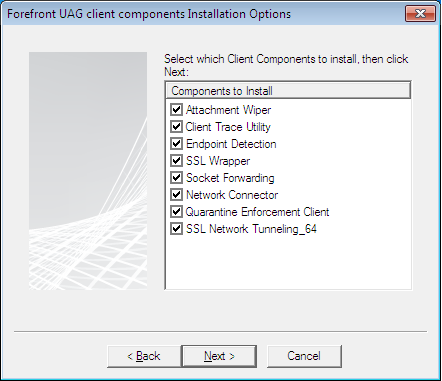
    When manually installing the WhlClientSetup-all.msi, the users will be given the choice for Typical installation or Custom Installation to pick specific components as per the below screenshot.
     
    Forefront UAG 2010 client components installation options


    2.    Remote Desktop Services (RDS) and RemoteApp need the latest Remote Desktop Connection 7.0 client update for Remote Desktop Services (RDS) for Windows XP SP3, Windows Vista SP1/SP2 which can be downloaded from the following site  http://support.microsoft.com/kb/969084  

    This RDC 7.0 client is already installed by default on Windows 7 systems. If you using Network Level Authentication (NLA) on the RDS servers then you need to check this article http://support.microsoft.com/kb/951608 since the NLA is disabled on XP service pack 3.
     

    Once both components (UAG and RDS) are installed manually, the user will be prompted to approve running the ActiveX and adding the portal site to the browser trusted sites.


    Read More...

    Saturday, 21 January 2012

    DNS64 Not Healthy after Applying UAG SP1 Update 1 Rollup 1

    By January 21, 2012
    After applying the latest Rollup 1 for UAG SP1 Update 1 released on Jan 12, 2012 I noticed that the DNS64 is unhealthy under the Direct Access Monitor/Current status as shown in the below figure.


    DNS64 not healthy

    I did a reboot to the UAG/Direct Access server (although it’s not required by the fix) however the DNS64 component still showed unhealthy. I disabled/enabled direct access as follows:
    1.     Disabled Direct Access
    2.     Saved/Activated the configuration
    3.     Enabled Direct Access
    4.     GPupdate /force on the UAG Server
    5.     Applied the policy
    6.     Activated the configuration
    After that it all worked fine. I am not sure about the reason (Will try to check with Microsoft Team) however that workaround fixed my problem.
    Read More...

    Labels

    10mb gta 4 lite for android 200mb amazing spiderman 2 for android 2013 2016 2017 230mb amazing spiderman for android 32 bit 32 bit file 360 Security 40mb gta 3 for android 64 bit 7 8.1 AVG 2017 Antivirus AVG Free Antivirus 2017 Download For Windows (Update: Latest) AVP: Evolution v2.1 Aab e Hayat Episode 19 Aab e Hayat Episode 20 Aab-e-Hayyat Episode 18 Action Action Games Add-on Wordpress Plugin Add-ons Adobe Adobe Photoshop 7.0 Adventure Adventure Games Alien bugs defender apk All in One ISO American Truck Games Android Android APK Android Apps Android Games Android Software Android/Mobile Angry Birds 2 Antivirus Antivitur Smadav Latest Version Apk Apps Arcade Games Arcade and Action Articles Assassin�s reed: Identity apk games Avira Antivirus Downlaod. Bangla Software Beneath The Lighthouse Best Camtasia Studio Best screen recorder. BioHazard 4 Mobile (Resident Evil 4) APK GAME Blog And Magazine Wordpress Themes Blog Tricks Blogger Templates Bluestacks emulator Books Books and Reference Browser Bus simulator racing apk Game Business CBSE Board CCleaner CCleaner 5.25 CCleaner Latest Version. Best PC Cleaner CCleaner v5.17 latest CD Writer Calling-App Camtasia Studio 8.6 Car Games Cargo airplane simulator 2017 Apk Game Casual Class Wise Books Clue Club Full version CodeCanyon Commandos Strike Force Game Highly Compressed Communication Computer Converter Corel Draw 9 Corel Draw X7 Corporate Corporate Wordpress Theme Creative Creative Market Creative Wordpress Theme Cricket Cue Club Download Cue Club for PC Cut The Rope: Magic DINO GUNSHIP Airborne Hunter DLF DRP DU Cleaner for PC DVD Writer Data Recovery Latest Software Data Recovery Software Desktop Desktop Wallpapers Deus Ex: The fall APK GAME Development Dictionary DirectX DirectX 11.2 DirectX 12 Download Directory & Listings Download Download Manager Download Softwares Dragon ball: Tap battle APK GAME Drivers EA Sports Cricket World Cup 2015 Free Download EA Sports FIFA 15 Free Download Full Version Editing Tools Education Egg Car-Don't Drop the Egg! for PC Elegantthemes Enemy Strike Enemy Strike 2 Entertainment Extensions Pack FACEBOOK INVISIBLE NAME TRICK Facebook Farm Games Fazil examination result 2017 Fazil result 2017 Fifa Games Fighting Fighting Games File Share Firefox Flappy Bird Flying Forms Free Free Downlaod .NET Framework Version 4.6.2 Free Downlaod K-Lite Code Full Latest Version Free Downlaod Media Payer Classic Latest Version Free Downlaod Smadav 2017 Free Download Avira Antivirus 15.0 Free Download Avira Antivirus Latest Version Free Download Microsoft Office 2017 Free Download PDF to Word Converter Free Download Smadav antivirus Free Download Utorrent Free Downloads Free Dwonlaod Media Player Classic Free Software Free Softwares Free Themes Free Themes Download Free download Microsoft Security Essentials Free download mozilla firefox latest version Freedom Fighter Free Download Full Version Frenzy Games GTA GTA 5 ENB Graphics Mod For Android GTA 5 Graphics Mod On GTA San Andreas GTA 5 Redux Mod GTA Games GTA San Andreas GTA San Andreas High Graphics ENB Mod GTA San Andreas Ultra ENB Graphics Mod GTA pc game Games Games Collections Games In Parts Games Under 1 GB Games Under 100 MB Games Under 200 Mb Games Under 300 MB Gaming Geometry Dash Meltdown PC Geometry Dash Meltdown for PC Geometry Dash Meltdown on PC Geometry Dash Meltdown windows Gifs Giphy For Messenger Grand Theft Auto Hack Tricks Highly Compressed Games Hollywood Hollywood Movies Horizon Chase Horizon Chase-World Tour Horror Games Hosting Hotspot Shield Elite How to How to run ICC IDM FULL CRACK LIFE TIME IDM patch IPL IPL 10 IPL 6 ISO Files Image Editors Imo InPage Urdu Interface Elements Internet Internet Tricks Jelly Splash K-Lite Codec KM Player Latest Version KM Player Latest Version Download KMP KMPlayer 4.1 Laptop Laptop Free Download Launcher Love Rocks Shakira Mac Windows Vista Marketing Marvel Marvel games Marvel super heroes Mass Effect Infiltrator APK GAME Media Media Player Media and Video Membership Menus Microsoft Microsoft Edge Browser Latest Version Microsoft Office 2007 Microsoft Office 2017 Minecraft � Pocket Edition latest apk. Miscellaneous Mission Games Mobile Games Modern Combat 2 Black Pegasus HD Mortal Kombat X Mod Apk Movie Trailer Movies Multimedia Multipurpose Blogger Template Music and Audio Namal Episode 22 Namal Episode 23 Nebulous Need For Speed Mod APK All GPU Need Software Neko Atsume: Kitty Collector Nero Nero 2015 Nero Burning ROM Nero Burning ROM 2015 Nero Burning ROM 2015 16.0.02700 Net framework latest version New Year 2016 Novels OS OW Office Offline translator apk Offline-Installer Online Open World Games OpenWorld Opera 42.0 Operating System Operatingsystem Other Other Tech Tricks Oxford English Dictionary PC PC Cleaner PC Games PC Tricks PC Windows PC games 2016 PDF to Word Converter PDF to word. Photo Editing Tools Photography Platform Games Plugins Portfolio Premium Blogger Templates Productivity Project Management Tools ProjectPanorama Protection Proxy Puzzle RAW ROTO RPG APK GAME Racing Racing Game Racing Games Rayman Adventures Real Cricket Real Football 2013 Recovery Recuva 1.53 Responsive Blogger Template Review Run Run Super V Rush N Krush SEO Tools SHAREit 3.5.0 Samurai II vengeance apk games Security Software Serial Keys Setup Downloads Shareit Shooting Shooting Games Shopping Simulation Sky Squad Skype Skype Latest Version Skype Offline Installer SmackDown Smadav 11.1 Smadav 2017 Smadav Latest Version Small Games Snooker Social Social Network Tricks Software Softwares Soliloquywp Sonic Dash 2: Sonic Boom Splinter Cell Conviction HD APK GAME Sports Sports Games Strategy Street Fighter 2017 Street wars APK GAME Study Material. SuperB Cleaner T20 Technology Telephone calls The Amazing Spider Man 2 v1.2.0m Apk + Mod + Data Cracked for android The Dark Knight Rises v1.1.6 APK (Mod Offline) Data Full The Mars files: Survival Apk game TheEventsCalendar ThemeForest Themes Pack Titanfall: Frontline Apk Game Tools Traffic Rider Trailer Travel and Local Tubemate UC UTorrent 3 Uc browser latest version Universal Drivers Pack 2017 Update DirectX Urdu Inpage 2011 Urdu Novels Download Urdu Tools Urdu-Software Utilities Utilities WordPress Plugin Utility Software Utorrent VLC 2017 VLC Media Player Viber Viber Latest Version Video Video Editing Video Editors Video Songs Video Songs Download VivaVideo Pro: Video Editor v4.5.8 apk for android Vivo Vivo IPL 2017 Game Free Download Vivo IPL 9 Vivo IPL Game Download Vivo IPL T20 2016 WP Plugins WP Sliders WWE WWE 2009 highly compressed for android WWE 2K18 PSP For Android WWE SVR 2008 Highly Compressed For Android WhatsApp APK 2017 Free Download (Latest Update) Wild Blood APK GAME WinRAR WinRAR 5.40 WinZip 21 Full Version Window Windows Windows 10 Windows 10 2017 Windows 10 32 / 64 Bit Windows 10 Download Windows 10 Full Windows 10 ISO Windows 10 ISO Download Windows 10 Key Windows 10 apps Windows 7 Download Windows 7 ISO Windows 8 Windows 8.1 Windows ISO Windows Phone Windows Phone Games Windows Phone OS Windows Vista Windows XP Service Pack 3 Windows software Wish Wish - Shopping Made Fun WooCommerce WooThemes Wordpress Plugin Wordpress ThemeForest Themes Wordpress Themes Wordpress Tricks Wordpress Tutorials WorldCup Xbox games 2016 Yithemes Youtube video downloader Zapya android Zapya for windows addons adventure game all in one iso free amazing spiderman 2 highly compressed amazing spiderman 2 lite amazing spiderman 2 mod apk amazing spiderman for android amazing spiderman highly compressed for android amp android app android launcher app application archiver audios best android apps best android launcher best android launcher 2016 best apps best apps 2016 best file sharing tool best firefox addons best music apps best music extension chrome best video games best web browser best windows apps bully anniversary edition lite version bully anniversary mod apk bully highly compressed parts bully lite ccleaner 2016 for pc ccleaner 2017 for pc ccleaner pro key ccleaner pro plus chat chrome chrome music extensions combat compressed comunication cool windows 10 apps coolest games crap cleaner dia Player Classic directions directx 11 download directx 8.1 download directx download directx download filehippo directx download free directx download windows 7 directx download windows 7 64 bit directx download windows 8 directx sdk download download dragon ball xenoverse 2 on android download microsoft security essentials download windows 7 ISO dragon ball all games on android dragon ball xenoverse 2 for android dragon ball xenoverse 2 ppsspp dragon ball xenoverse 2 real mod dragon ball xenoverse for android dragon ball xenoverse game android drawing droid eCommerce eCommerce WordPress Plugin eCommerce Wordpress Theme edge browser download enterprise facebook messenger facebook messenger v1.5.005 facebookmessenger.apk fallen fallen nation farming simulator 16 apk obb farming simulator 16 download free farming simulator 16 free fast file sharing app fazil 1st year result 2017 fazil 2nd year result 2017 fazil 3dd year result 2017 fazil final result 2015 finder flash flashcards flirt football for PC for PC Computer free apps download free call free call software free compressing tool free download free download best web browser free download google chrome for pc full version free download opera free download opera latest version free download uc borowser free download uc browser 6.0 free games world cup 2016 free music apps free video call free vpn free windows 10 apps full game full setup full version full version 2016 world cup game full version latest google google chrome free download google chrome free download latest version google maps google maps v6.0.3 google music player google shopper google shopper v2.3 googlemaps.apk googleshopper.apk gps gps navigator gta 3 40mb for android gta 3 highly compressed for android gta 3 lite version for android gta 4 lite for android gta 5 for android gta 5 real android download gta india for android gta india highly compressed gta india lite mod for android gta india lite version for android gta india mod highly compressed for android gta sa IV for android gta sa ultra graphics for android gta sa ultra graphics mod for android gta san andreas hd graphics gta san andreas hd lite for android gta san andreas ultra graphics mod gta v apk+data gta v for android gta v playstore gta v real apk gta vice city gta vice city 200mb highly compressed gta vice city android gta vice city for android gta vice city free for android gta vice city highly compressed gta vice city mob.org hitman hotspot hotspot shield for mobile iPhone 10 iPhone 8 iPhone 8 Plus iPhone Games iPhone X idm idm cc idm crack idm download free idm full version image file install internet download manager ipl apps 2016 ipl cricket live streaming ipl live matches 2016 iso for all windows version joy junk cleaner kmspico latest latitude lifetime activation live live cricket matches ipl 2016 live cricket score live streaming live streaming apps live tv live tv flash live tv flash v2.7 livetvflash.apk mac maps market market v3.4.4 market.apk meet messages messenger microsoft edge vs chrome microsoft office microsoft office download microsoft toolkit microsoft toolkit download microsoft toolkit latest 2.6.7 minecraft minecraft for android minecraft pocket edition minecraft v0.15.6.0 latest mobile tv mobiles modern modern combat modern combat 3 modern combat 3 fallen nation modern combat 3 fallen nation v1.0.1 modern combat highly compressed modern combat versus mod apk modern combat versus unlimited money money most anticipated games most productive addons movie moviefone moviefone - movies and showtimes moviefone - movies and showtimes v1.8.43.2 moviefone.apk mozilla firefox free download mozilla firefox free download for windows 7/8/10 mozilla firefox offline installer mp3 downloader ms office music music downloader music extensions list must have apps 2016 nation navigation navigator net framework new version new year apps office 2010 toolkit office toolkit offline offline installer online tv orweb orweb proxy privacy browser orweb.apk orweb: proxy+privacy browser v0.2.2 paid version paint paint joy paint joy - movie your drawing paint joy - movie your drawing v1.9.1 paintjoy.apk panda pandaapp pandaapp v1.1.1 pandaapp.apk paper paper toss paper toss v1.0.9 papertoss.apk pc game pc optimizer photo photofunia photofunia v2.0.7 photofunia.apk places player playstation game police scanner power poweramp poweramp music player poweramp music player v2.0.4-build-467 poweramp.apk privacy pro proxy privacy browser puzzel radio radio scanner registry cleaner rufus sat sat vocab visuals and audios sat vocab visuals and audios v1.1 satvocabaudios.apk scanner scanner radio scanner radio v3.5.1 scannerradio.apk security setup shopper showtimes skout skout - meet chat flirt skout - meet chat flirt v2.8.1 skout.apk skype free download skype free download for android smartphone launcher soccer sonic sonic soundboard sonic soundoard v1.2 sonic the hedgehog sonicsoundboard.apk soundboard spb spb tv spb tv v2.2.1 spbtv.apk streaming study studydroid studydroid flashcards studydroid flashcards 2.0-free studydroid flashcards 2.0-free v3.3.0 studydroid.apk super superuser superuser v3.0 superuser.apk telenav telenav gps telenav gps navigator telenav gps navigator v1.0 telenav navigator telenavgpsnavigator.apk tiny tiny tower tiny tower v1.3.6 tinytower.apk top firefox addons top music extension toss tower truck simulator pro16 for android truck simulator pro2 free for android truck simulator pro2 mod apk truck simulator pro2 unlimited money tv tv viewer uc browser uc browser free download latest version uc browser full version ultimate ultimate alliance upcoming video games update gta vice city user video calls video tutorial making tools. Latest camtasia visuals vlc download vlc latest version vlc media player 2.2.4 vlc media player download vocab vocabulary voicemail voicemail vT.5.2.0.24 voicemail.apk web wifi wifi finder wifi finder v3.2 wififinder.apk win8 key window 8 keys download windows 7 windows 7 activator windows 7 all edition windows 7 all in one iso windows 7 free download windows 7 loader windows 7 pro activation windows 7 ultimate windows 8 activation key windows 8 product keys windows XP windows XP professional ISO windows activator windows applications windows apps windows installation media windows iso free download windows toolkit winrar latest world channels world cup 2016 world cup 2016 game download world popular 3 player wwe 2k download android wwe 2k free for android wwe 2k mod apk wwe 2k mod.org wwe 2k unlimited money wwe 2k18 for android wwe 2k18 ppsspp for android wwe 2k18 ppsspp iso for android wwe 2k18 real mod for android wwe smackdown vs raw 2009 for android wwe svr 2009 for android xbox game zip archives zip extractor